aPOS

The POS built for how Maldivian businesses actually run. Built by AriWorks for shops and restaurants across the Maldives.

POS · STOCK · PAYMENTS · TRUE COST

aPOS by AriWorks

The POS built for how Maldivian businesses actually run.

Sell faster. Keep stock moving from Malé to your island. Track what it really costs to run the business — and see what you actually earn.

Made for MVR, GST, MIRA, BML, and island logistics — not a generic POS with a Maldives sticker. aPOS does not file your GST return.
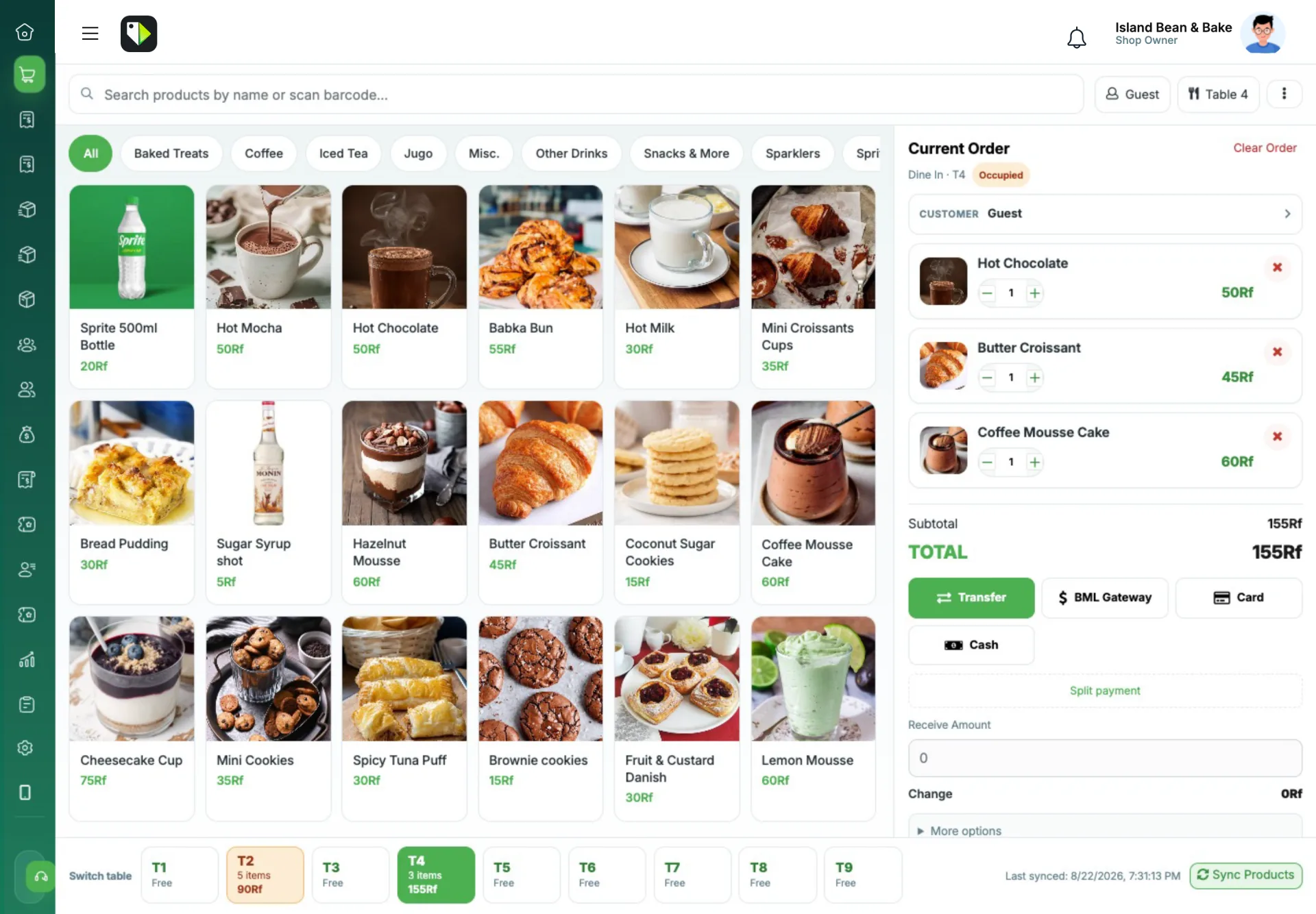
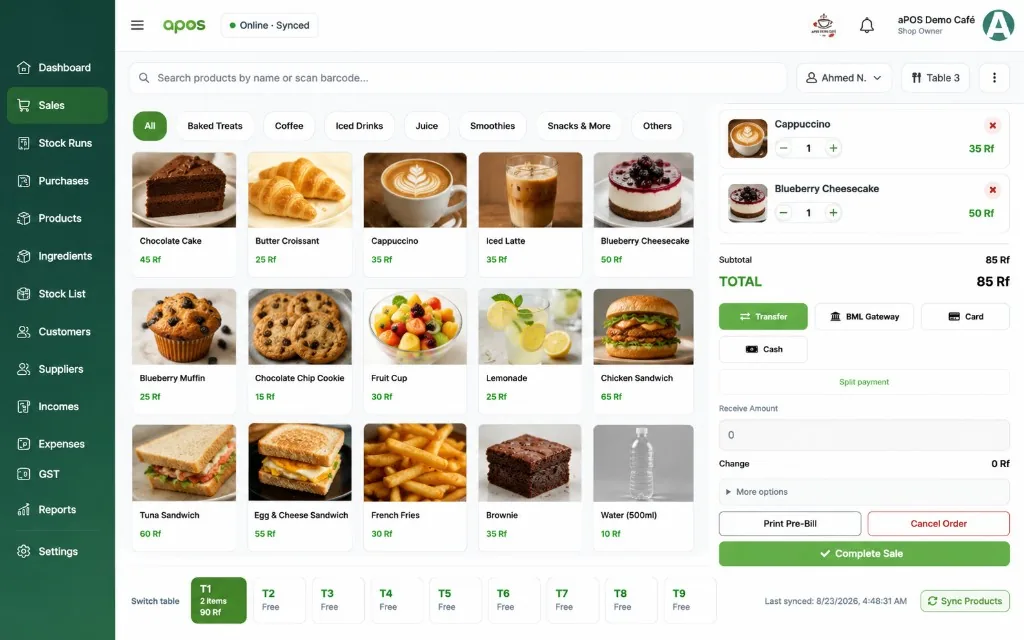
aPOS restaurant till for a Maldivian café — tables, ticket, and pay buttons in rufiyaa
01 Sell faster Till, tables, receipts
02 BML built in Alerts, Pay, MPQR
03 Stock Runs Malé to the island
04 Works offline Sell, then sync
05 Restaurant ready As simple as you need
06 Online Order Your own shop address
07 QR Table Order Guests order, ticket grows
08 My aPOS Customers keep their bills
09 True Cost Ingredients, fees, rent
10 GST / MIRA ready Pack for the accountant
11 Payroll Payslips, extra hours, advances
12 Staff Face Who did what on the till
13 Telegram + Viber Bills and alerts

Sell and get paid

BML isn't an afterthought.

From payment alerts to customer settlement, aPOS keeps the sale and the money connected.

aPOSAlerts

BML money in. Sale closed. No Viber archaeology.

When a customer transfers to your BML account, aPOSAlerts reads the bank push, suggests the unpaid sale, and tells the cashier on the POS — plus Telegram. You still confirm the match. No hunting through old chats.

  • Payment notification reaches aPOS
  • Suggested match to the unpaid sale or due
  • POS toast so the counter sees it immediately
  • Telegram copy for the owner who is not in the shop
Incoming BML pushBML
MVR 1,250.00 credited to ****4521
Matched → Table 7 / Sale #8812Confirm
Telegram · “BML received”Sent

BML Pay

Tap Pay with BML on the bill. The due closes itself.

Connect your Bank of Maldives merchant account in aPOS. Unpaid public receipts get a Pay with BML button. The customer pays in BML Connect; the webhook marks the sale paid. WhatsApp and Viber still send the receipt link — they do not have to chase you on Viber.

  • Official BML Connect app: Application ID and API key, sandbox or production
  • Pay with BML on unpaid public receipts — no extra app for the customer
  • Webhook clears the due when BML confirms the payment
  • MPQR at the counter when they pay in the shop, not from the bill
BML POS Connected · Production
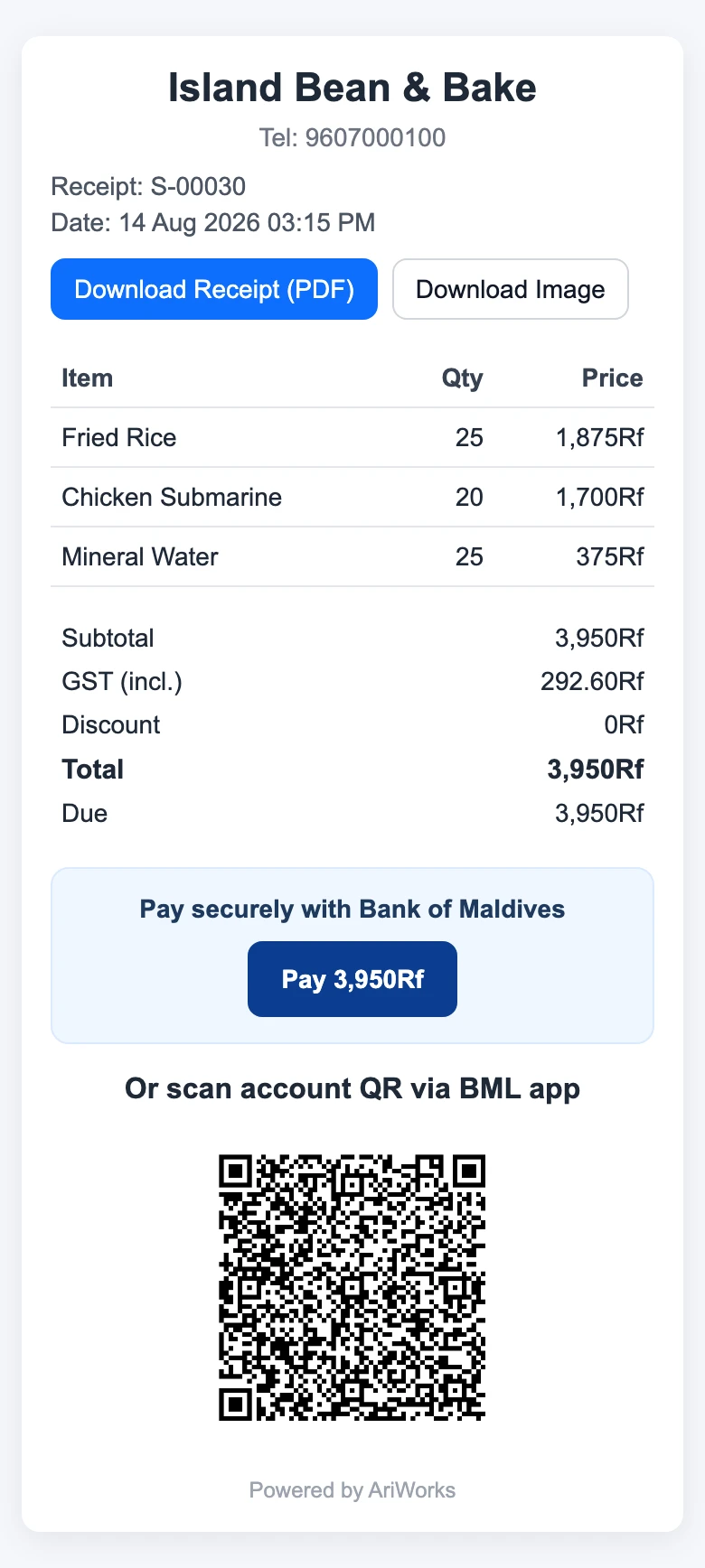
Public aPOS receipt with Pay with BML and a Bank of Maldives account QR

Know what you have

Procurement that understands Malé harbour, not just a warehouse.

Purchase from Malé, follow what's coming on the boat, receive what reaches the island, and move it into stock without losing the trail.

  • Malé purchases and island/local buys on the same run
  • Real statuses: Shopping → Waiting for Payment → Paid → Loaded to Boat → Collected → Received
  • Share /po with the buyer — no POS login
  • Receive into inventory, then book cargo as expense
  • Optional FollowMe vessel status: Malé in, Malé out, heading home, near home island
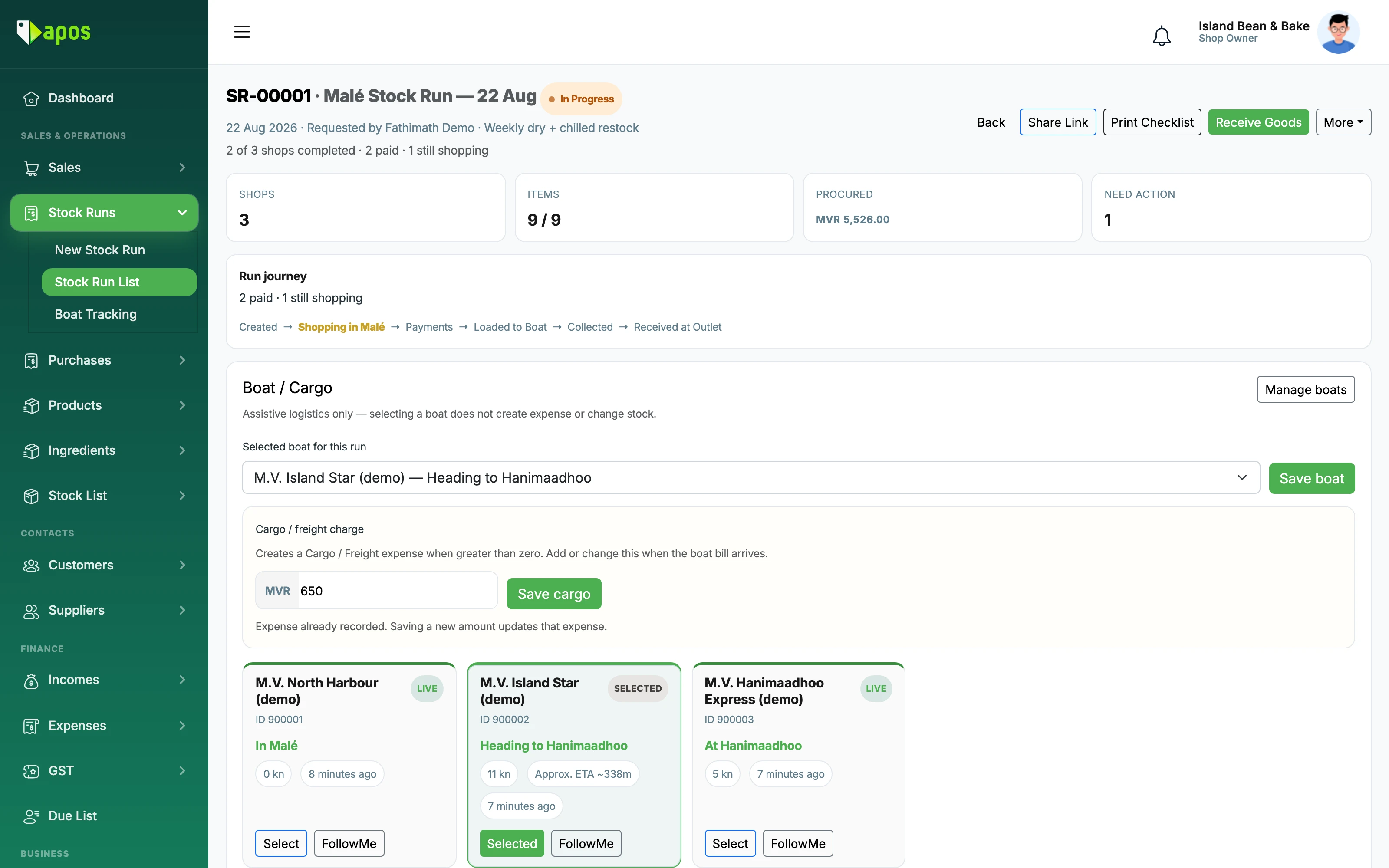
Malé stock run in aPOS — shops, cargo charge, and boat status toward the island
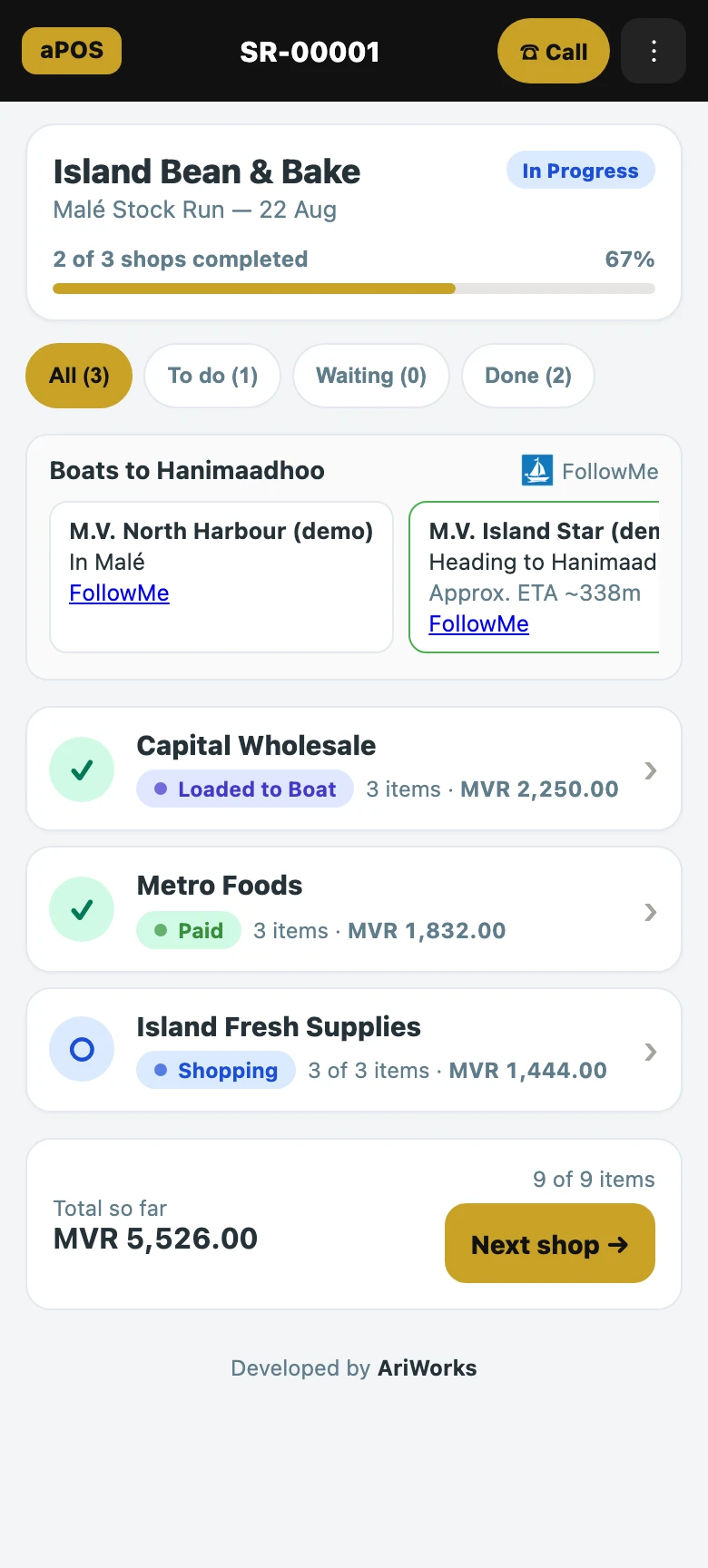
Public stock-run shopping list on a phone — no POS login needed

Restaurant flexibility

Run a café simply. Go deeper when you need to.

Start with menu items and tables. Track physical stock when it matters. Add ingredients, recipes, production and costing only when your operation is ready.

Recipes are optional. Use aPOS as a simple menu POS, track physical stock, add recipes, or run production — any mix that fits the business.
  • Simple menu POS
  • Tables & pre-bills
  • Physical stock
  • Ingredients & recipes
  • Production
  • Daily Prep
aPOS café till — product grid, Table 3 ticket, and BML Gateway on the pay row

Customer ordering

Let the customer place the order. It still lands on your till.

Your shop gets its own address. Orders from the web and from the table arrive in one queue on the POS — your products, your prices, your GST, and the same invoice you always print.

Online Order

yourshop.openapos.com. No app for anyone to install.

Publish the products you want to sell online, choose delivery or pickup, and share one link. The order arrives at the counter with the customer, the items, and the fee already on it — instead of a Viber message somebody has to retype into the POS.

  • Your own shop address on openapos.com, ready to send in a chat
  • Only the products you publish, at the prices already in aPOS
  • Opening hours built in — pause online orders when the kitchen is full
  • Delivery fee carries GST properly, and comes back on a refund
  • Staff Accept turns the order into a normal sale, stock and all
New online order · #A-117Delivery
2× Fish Bun · 1× Iced Latte · MVR 96.00
Delivery to HulhumaléMVR 30.00
Accepted → Sale #8813On the till

QR Table Order

The table orders. Your open ticket just grows.

Print a QR for each table. Guests scan it, read today's menu, and send the order straight to the ticket you already have open. The cashier accepts and the items are added to what is there — nothing you rang is overwritten.

  • One QR per table, on a token that does not spell out the table
  • Accept appends to the open ticket; the new lines reach the kitchen docket unprinted, like anything else you ring
  • If the ticket changed while you looked away, aPOS refuses the stale save instead of merging it wrong
  • Guests can call a waiter from the same screen
  • Optional location check, so the menu opens for people actually in the café

Guests order from the table; paying still goes through your staff. Guest payment from the table QR is not in this version.

Table 3 scanned the QRAt the café
Guest sent · 2× Mas Huni · 1× Tea
Accepted → added to open ticket2 new lines
Kitchen docketNot printed yet
Table 3 · Call waiterRinging

My aPOS

One place for your customers to find their own bills.

my.openapos.com belongs to the customer, not to one shop. They sign in with the fingerprint or face already on their phone — no password to forget — and see every outlet of yours they buy from, what they still owe, and the receipts behind it.

  • Passkey sign-in: the phone's own fingerprint or face, no password
  • Every linked outlet on one screen, with the balance for each
  • Receipt history they can search — “which day was that big order?”
  • Unpaid bills with Pay with BML where the shop has it switched on
  • Reorder button straight back to your online menu
  • The customer can unlink an outlet themselves, any time

Receipts and balances only. aPOS does not build spending profiles on your customers — no lifetime totals, no monthly averages, nothing to sell to anyone.

Signed in with passkeyNo password
Island MartMVR 340.00 due
Harbour CaféSettled
Receipt S-8790 · 3 itemsPay with BML

Daily Prep

Made 10. Sold 8. What happened to the other 2?

Daily Prep keeps track of what you make for the day, what's sold, what carries forward, and what ends up as waste or staff consumption.
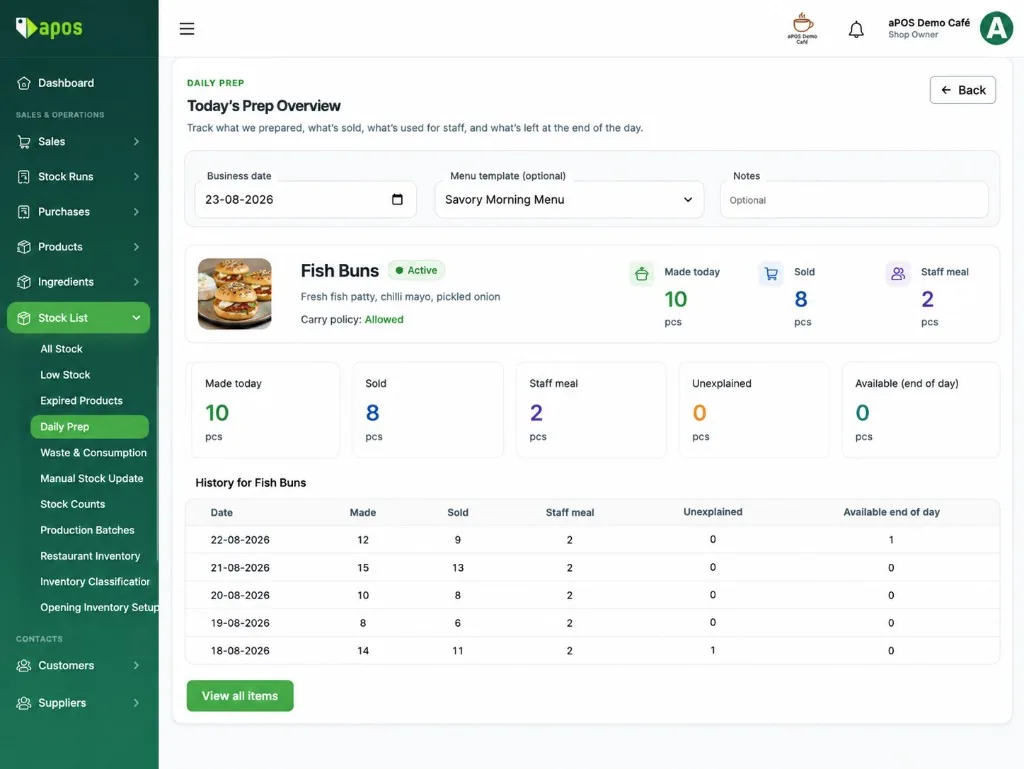
  • Made today, sold, staff meal, and unexplained — on one board
  • Optional menu templates for the morning bake
  • History by item so yesterday is not a guess
Daily Prep for Fish Buns — made 10, sold 8, staff meal 2, unexplained 0

Staff Face Verification

Rush hour. One till. aPOS still knows who did what.

Most shops do not log out between cashiers. Ahmed stays signed in while Mariyam takes the next sale, voids a table, or opens the drawer. When Staff Face Verification is on, the till camera records the Shop Owner, Manager, or Staff who actually did it — so the shop has a steady audit, and nobody has to argue about a missing due or a cancelled ticket.

That protects the business when something goes wrong. It also protects the people on the counter: the record names the person who was there, instead of blaming whoever happened to be logged in.

Off by default. Enroll Shop Owners, Managers, and Staff. Owner password still works as a backup. Needs a webcam. This is a shop audit trail, not a certified ID check.

  • Shared till during rush — stay logged in, still name who served
  • Checks Complete Sale, due collect, table cancel, drawer, edits, and Day End
  • Sign-in stays email and password. The camera is only for the till.
  • The name is written on the action, for the owner and for the team
Mariyam looking straight at the till camera during Staff Face Verification Look straight at the camera
Signed inAhmed · session stays
Complete Sale · Table 4Verify
Matched · MariyamRecorded
Audit · Performed by MariyamNot the logged-in name

True Cost

See what you actually keep after ingredients, fees, and rent.

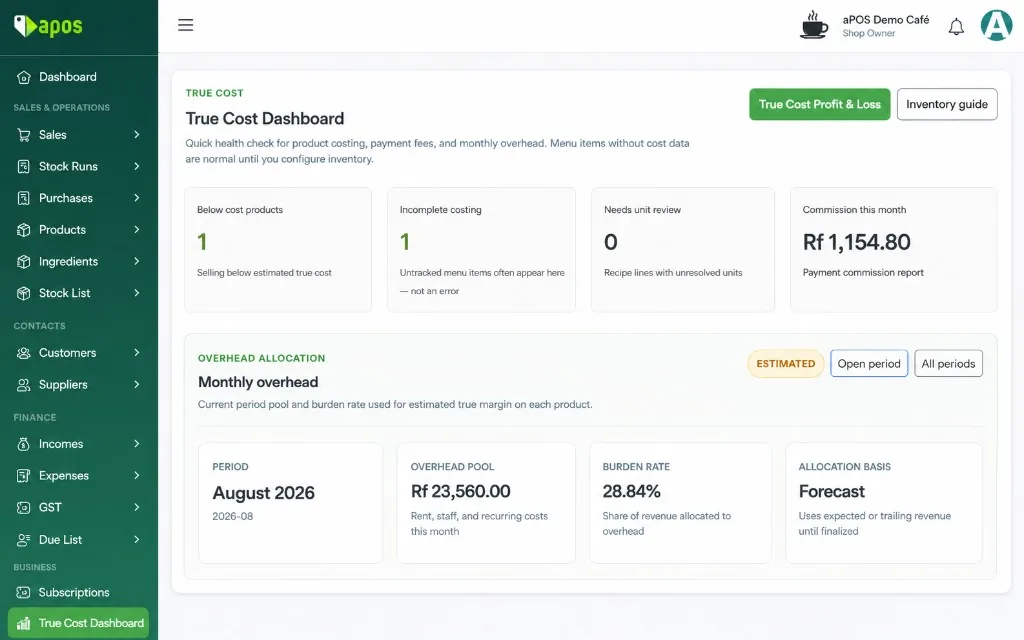
Sales are not profit. aPOS brings together product cost, ingredients, payment fees, waste and the cost of running the business — so the number at the end actually means something.

Start simple. Add costing when you need it. True Cost becomes more useful as you add inventory, recipes and business costs.
  1. Sales
  2. Product cost
  3. Payment fees
  4. Waste
  5. Rent, staff & overhead
  6. True Profit
True Cost dashboard showing products that need attention, payment commissions, and monthly overhead

See what needs attention.

Products selling below cost. Missing cost data. Payment commissions. Monthly overhead. One place to understand what still needs fixing.
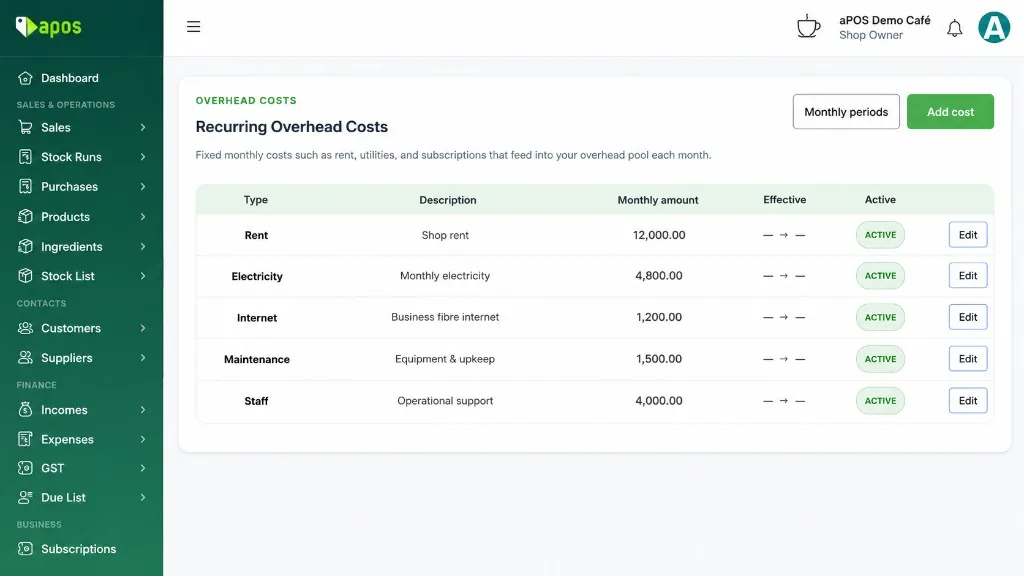
Recurring overhead in aPOS — rent, electricity, internet, and staff costs

The bills count too.

Rent. Electricity. Internet. Maintenance. Staff. The money that leaves every month belongs in the calculation too.
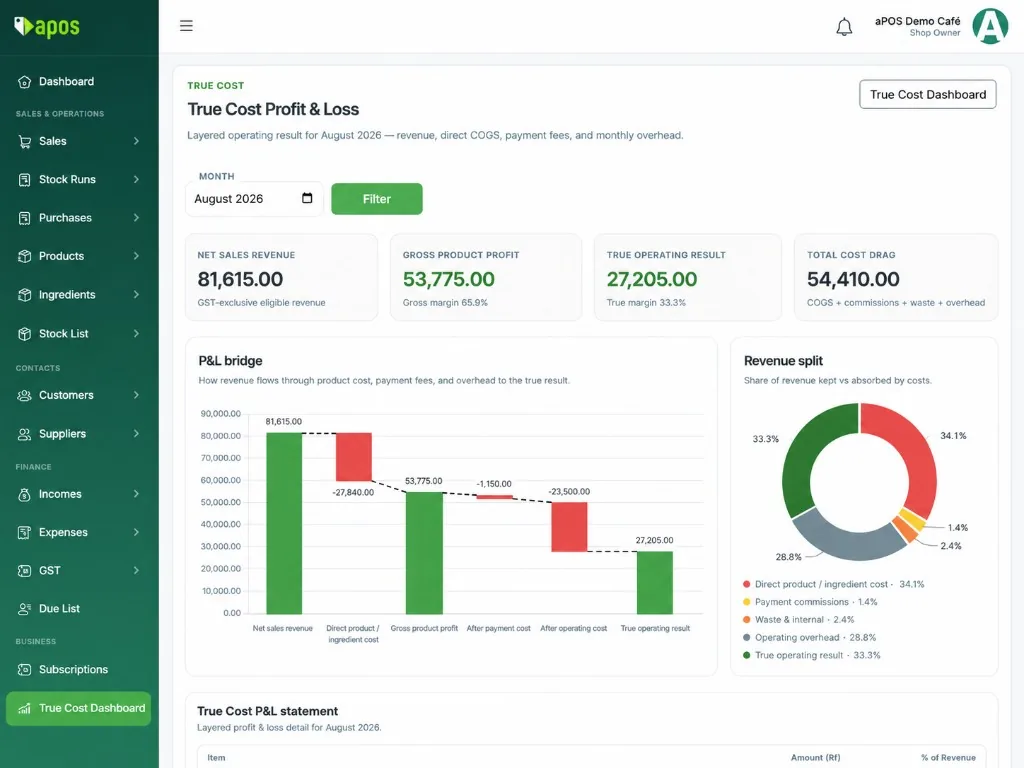
True Cost profit and loss in aPOS — layered revenue, costs, and operating result

From sales to the number that matters.

Follow revenue through product cost, payment fees, waste and operating overhead — all the way to the actual operating result.

Everyday operations

The boring stuff is handled too.

Offline selling, GST for the accountant, paying staff, and getting a supplier invoice onto the shelf.

Offline POS

Internet drops. The till closes not.

Island links fail mid-service. aPOS keeps the cart, table tickets, and cash sales on this terminal, then syncs each sale once the line comes back. No duplicate invoices.

  • Reload the POS with no internet — products and open tables are still there
  • Cash, card, and transfer queue locally; BML pay links wait for a connection
  • Print the receipt from the saved sale, even while offline

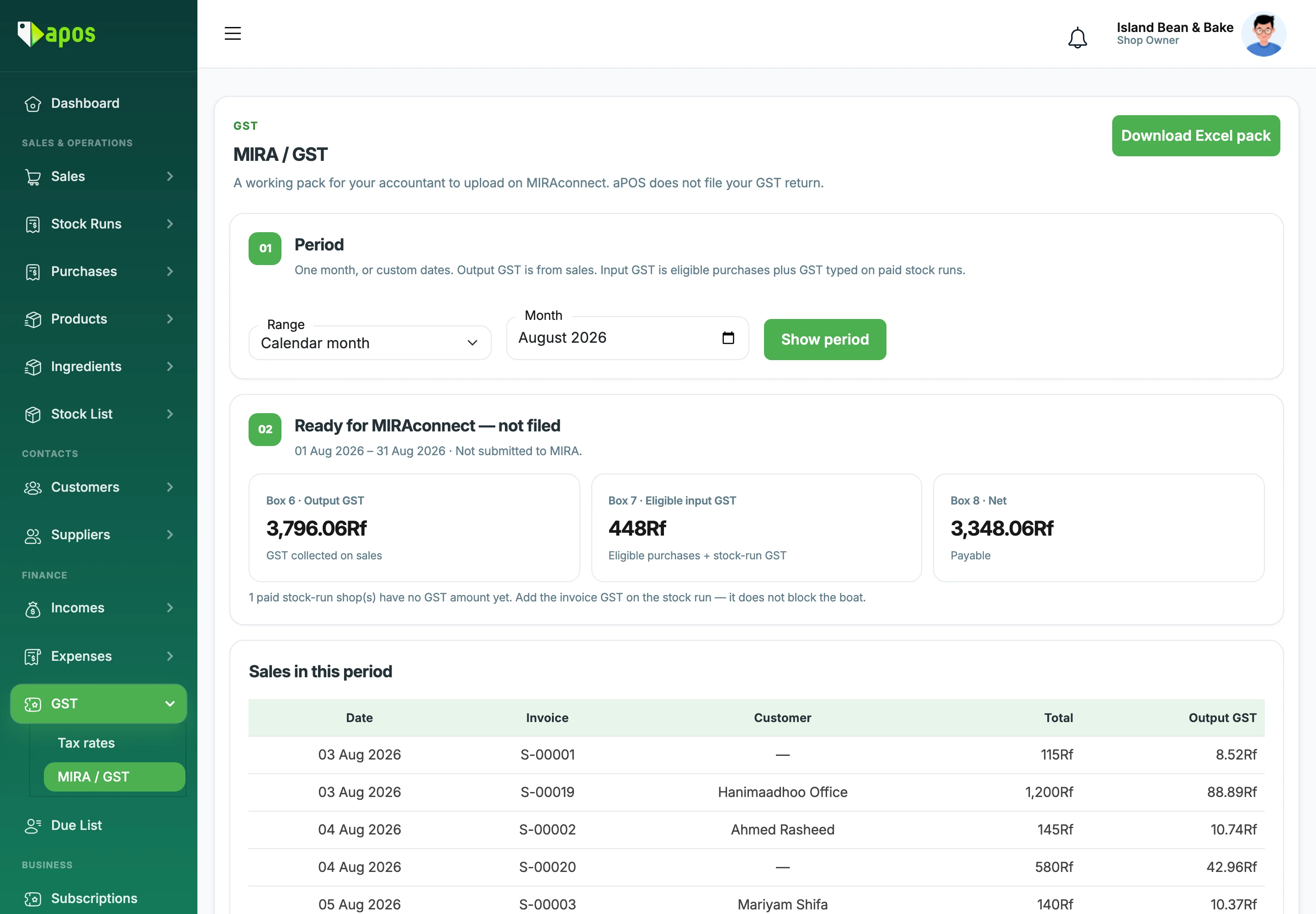
MIRA / GST

GST 8% on the till. A pack for the accountant.

aPOS puts GST on receipts and captures the purchase facts MIRA asks for. Your accountant uploads the period pack on MIRAconnect. aPOS does not file your GST return.

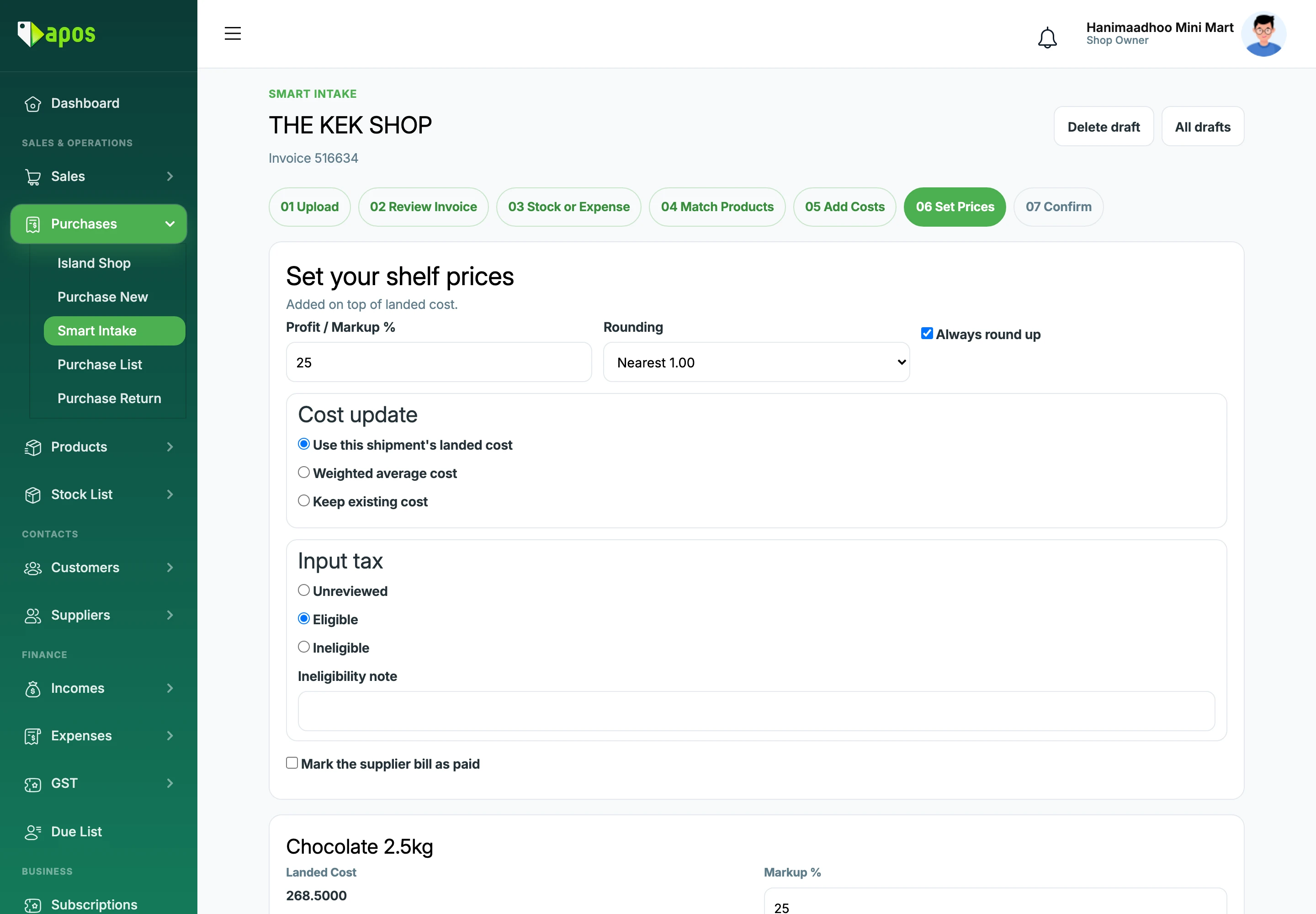
Smart Intake

From invoice to shelf in minutes.

Upload a supplier invoice, match your products, add boat freight and labour, and land the stock when you are ready. Built for the way island shops actually restock.

  • Match existing inventory and remember supplier item codes
  • Add cargo, boat and labour into landed cost
  • See prices before and after GST
  • Record bills as Expense Only when needed

Payroll

One slip. Salary, food, extra hours, and this month's advance.

Turn payroll on when you are ready. Staff profiles hold the name and ID that print. Extra hours and a salary-slip advance go on that payslip. Cash already handed over is a separate receipt. aPOS does not file payroll to MIRA, and it does not guess pension rates.
  • Fill extra hours for a month, delete days off, then approve
  • Pay an advance with this month's salary, or record cash already given
  • Print a compact payslip after you Approve & lock
aPOS GST period pack for MIRAconnect, marked not filed
Smart Intake in aPOS — supplier invoice prices, markup, and landed cost

The rest of the shop

A full POS, not a feature brochure.

And yes — it still does the regular POS work too.

Customers & dues

Named customers, FIFO due collect, public receipts, split payments, quotations, and returns.

Suppliers

Purchases, TINs, and the people you actually buy from in Malé and on the island.

Expenses

Day-to-day spend that does not belong on a stock invoice, recorded where you can find it.

Payroll

Staff profiles, extra hours, advances, and one payslip per person. Off until the owner turns it on.

Stock counts

Products, barcodes, low stock, and counts when the shelf does not match the book.

Telegram alerts

New sale, pre-bill, due collect, BML received, stock-run created — to the owner’s chat.

Viber posting

Push a product to the shop’s Viber Channel from the dashboard when you use it.

User permissions

Owners, managers, staff, and spectators. Staff get the modules you tick.

Reports

The reports you actually close the day with — sales, stock, and true-margin P&L when you need it.

Cash drawer

Open/close with MVR note and coin denominations. Blocked if tables are still open.

Mobile apps

aPOS APK for selling on the floor. aPOSAlerts APK for BML push matching.

Pricing

Plans that fit the shop

Start with a 30-day trial, create the business, then sell. Upgrade to Monthly or Yearly when you grow. True Cost and business insights are part of aPOS — not a separate product.

Trial

30-day trial

Then upgrade to Monthly or Yearly.

  • Unlimited Products
  • Unlimited Sales
  • Unlimited Staffs
  • Lifetime Updates
Start trial

Monthly

700Rf /30 Days

  • Unlimited Products
  • Unlimited Sales
  • Unlimited Staffs
  • Lifetime Updates
Get started

Yearly

6,500Rf /365 Days

  • Unlimited Products
  • Unlimited Sales
  • Unlimited Staffs
  • Lifetime Updates
Get started

Talk to us

See aPOS on your counter.

Run a quick demo, talk to us, or get started with the setup that fits your shop.